
背景
我在家里的飞牛 nas 上搭建了 halo 服务(个人博客),但是没有公网ipv4,只能ipv6公网访问,刚好手里有一台阿里云服务器,想着通过frp实现公网访问
方案
经过和大模型多轮沟通和反复验证,最终的技术方案如下:
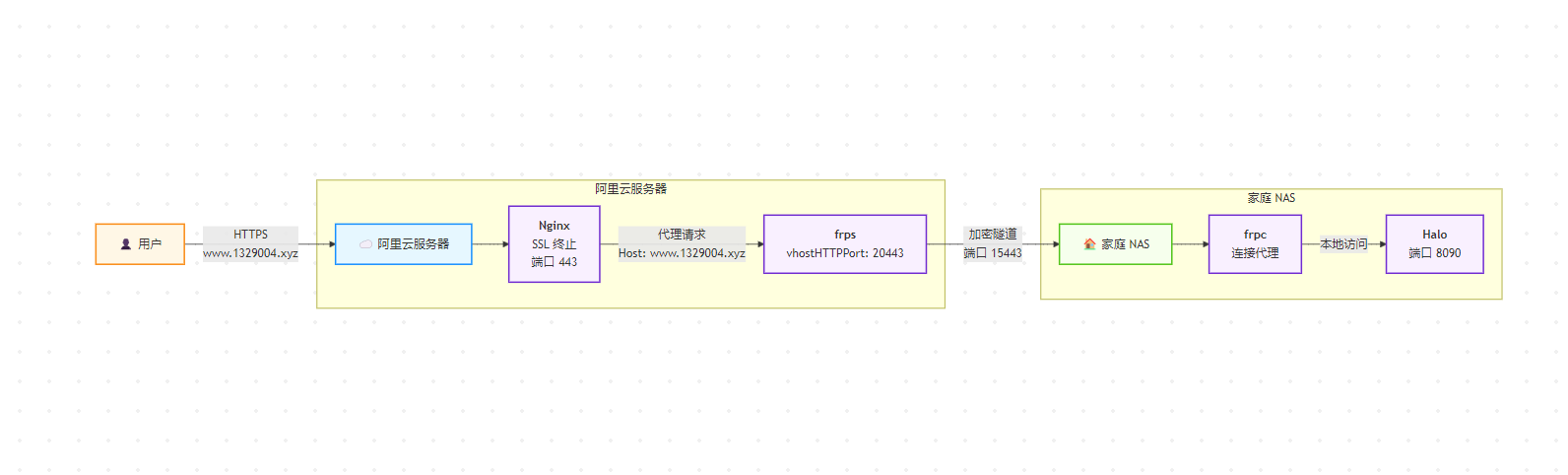
服务器配置
https 证书申请和 nginx 配置
申请证书:
sudo certbot --nginx --nginx-server-root /www/server/nginx/conf -d www.1329004.xyz --non-interactive --agree-tos -m yourmail@xx.comnginx配置:
注意:这里的配置不是nginx的完整配置,只需要在nginx主配置中引入该配置即可
server {
    listen 80;
    listen 443 ssl;
    server_name www.1329004.xyz;

    ssl_certificate /etc/letsencrypt/live/www.1329004.xyz/fullchain.pem;
    ssl_certificate_key /etc/letsencrypt/live/www.1329004.xyz/privkey.pem;

    if ($scheme = http) {
        return 301 https://$host$request_uri;
    }

    location / {
        proxy_pass http://127.0.0.1:20443;
        proxy_set_header Host $host;
        proxy_set_header X-Real-IP $remote_addr;
        proxy_set_header X-Forwarded-For $proxy_add_x_forwarded_for;
        proxy_set_header X-Forwarded-Proto $scheme;
    }
}
Frps 安装和配置
版本:frp_0.65.0_linux_amd64.tar.gz
frps配置文件:
frps.yaml
bindAddr: "0.0.0.0"
bindPort: 15443
vhostHTTPPort: 20443

auth:
  method: "token"
  token: "xxx"

webServer:
  addr: "0.0.0.0"
  port: 7500
  user: "xxx"
  password: "xxx"
在frps 安装配置过程中用到的一些命令:
设置frps为systemctl服务
服务描述文件
[Unit]
Description=frp server
After=network.target

[Service]
ExecStart=/usr/local/bin/frps -c /etc/frp/frps.yaml
Restart=on-failure
RestartSec=5s

[Install]
WantedBy=multi-user.target
验证配置文件:
/usr/local/bin/frps verify -c /etc/frp/frps.yaml服务重启:
sudo systemctl restart frps服务状态查看:
sudo systemctl status frps直接启动方便查看错误输出:
/usr/local/bin/frps -c /etc/frp/frps.yamlnas 配置
frpc 安装配置
在1panel直接安装,注意版本和服务端最好匹配
其他的服务器ip,端口,token,根据实际情况配置即可

安装好后,在管理页面进行配置
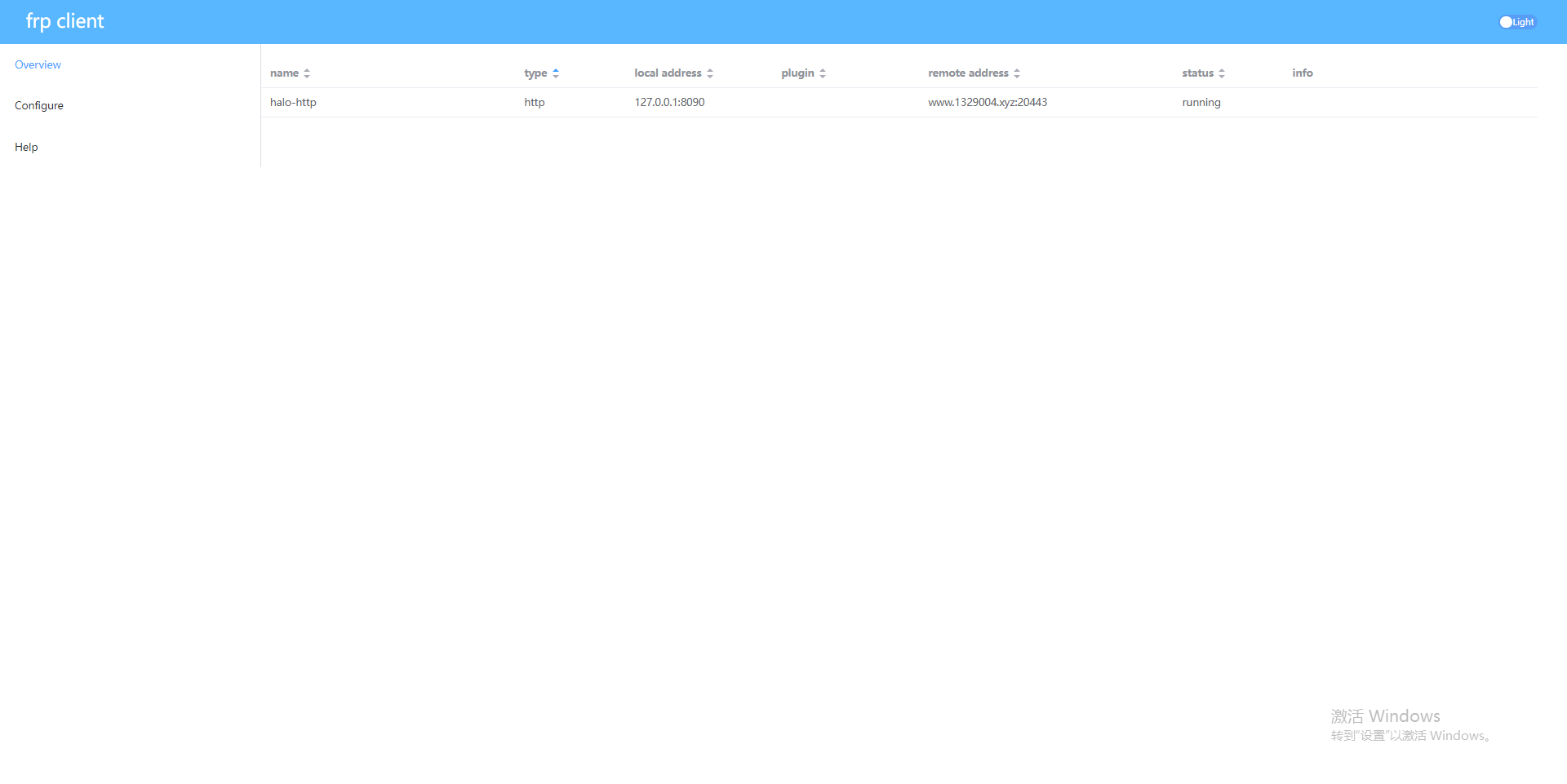
配置如下:
serverAddr = "xxx" # 阿里云公网ip
serverPort = 15443

auth.method = "token"
auth.token = "xxx" # 服务端设置的token

webServer.addr = "0.0.0.0"
webServer.port = 7400  # 控制台端口
webServer.user = "xxx"
webServer.password = "xxx"
webServer.pprofEnable = false


[[proxies]]
name = "halo-http"
type = "http"
localPort = 8090 #halo的端口
customDomains = ["www.1329004.xyz"] # 域名, 设置了 DNS A记录 指向 阿里云服务器 ip


[proxies.headers]
X-Forwarded-Proto = "https"
X-Forwarded-Port = "443"
结果
实现公网+https 访问家里nas上搭建的Halo博客
https://www.1329004.xyz/